
How to Get Your Site Indexed for ChatGPT (It Starts with Bing)
 Manuel YangDecember 23, 20246 min read
TL;DR: ChatGPT Search uses Bing's index. If Bing hasn't indexed your page, ChatGPT can't cite it. Set up Bing Webmaster Tools, submit your sitemap, enable IndexNow for instant updates, and don't block Bingbot, GPTBot, or OAI-SearchBot in your robots.txt. Getting indexed is step one—after that, it's about content structure and authority.
Everyone's optimizing for ChatGPT visibility, but most people are ignoring the obvious: ChatGPT Search runs on Bing's index.
OpenAI's VP of Engineering confirmed it during an AMA. When ChatGPT searches the web, it pulls from Bing. If Bing hasn't indexed your page, ChatGPT can't cite it. Full stop.
So all that AI SEO advice about "optimizing for LLMs"? Start with the basics. Get indexed by Bing first.
Why Bing Suddenly Matters
For years, Bing was an afterthought. Google dominated. Nobody cared about Bing Webmaster Tools.
That changed. ChatGPT queries Bing's index, grabs the top 20-30 results, and applies its own ranking to synthesize an answer. Your Bing SEO strategy is now your ChatGPT SEO strategy.
The good news: Bing is easier to rank on than Google. Less competition, faster indexing, and they actually want your content (unlike Google's increasingly hostile relationship with publishers).
Before You Start: Check Your Sitemap
Quick sanity check. Visit https://yoursite.com/sitemap.xml in your browser.
If you see an XML file listing your URLs, you're set. If you get a 404, you need to generate one first:
- WordPress: Yoast SEO or RankMath create sitemaps automatically
- Next.js: Use
next-sitemapor the built-in App Router sitemap - Static sites:
sitemap-generator-cliworks fine
Don't skip this. Sitemaps are how search engines discover all your pages, not just the ones they stumble across.
Step 1: Set Up Bing Webmaster Tools
Head to bing.com/webmasters and sign in. Microsoft, Google, or Facebook accounts all work.
Add your domain and verify ownership. You've got options:
- XML file upload - drop a verification file in your root directory
- Meta tag - paste a tag in your homepage's
<head> - DNS CNAME - add a record (cleanest for multiple sites)
- Import from Google - if you've verified in Search Console, Bing can pull that data
DNS verification takes the longest but requires zero code changes. Meta tag is fastest if you have quick access to your HTML.
Step 2: Submit Your Sitemap
Once verified, click Sitemaps in the sidebar. Hit Submit sitemap and enter your URL.
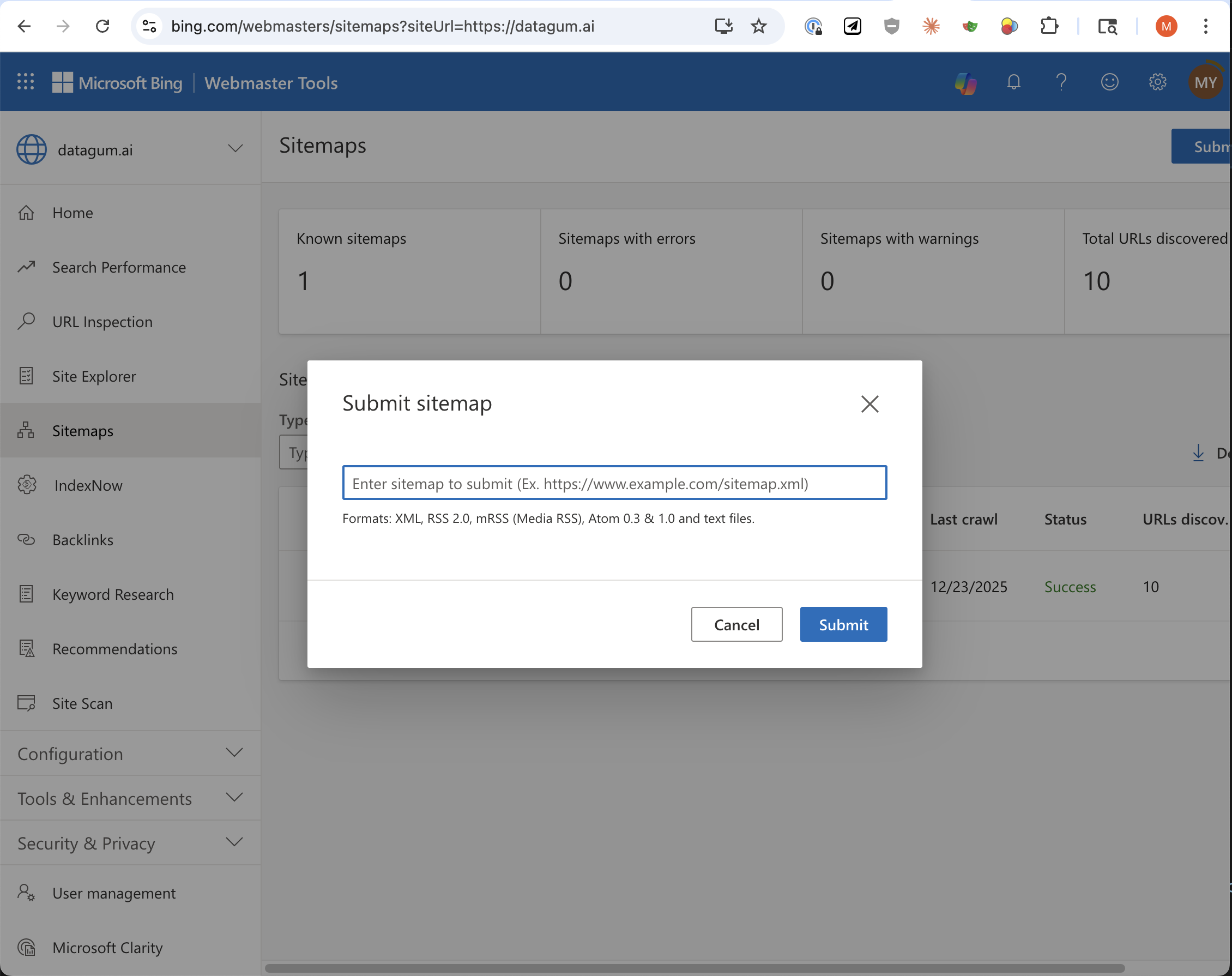
Bing starts crawling immediately. The dashboard shows how many URLs it discovered and when it last checked. If you see errors, fix them—broken pages won't get indexed.
Step 3: Enable IndexNow
Sitemaps handle discovery. But what about updates? When you publish a new post or update an existing page, you don't want to wait for Bing's crawler to notice.
IndexNow fixes this. It's an open protocol that lets you ping search engines the moment content changes. Bing, Yandex, Seznam, and Naver all support it. Ping one, and they share with each other.
The Setup
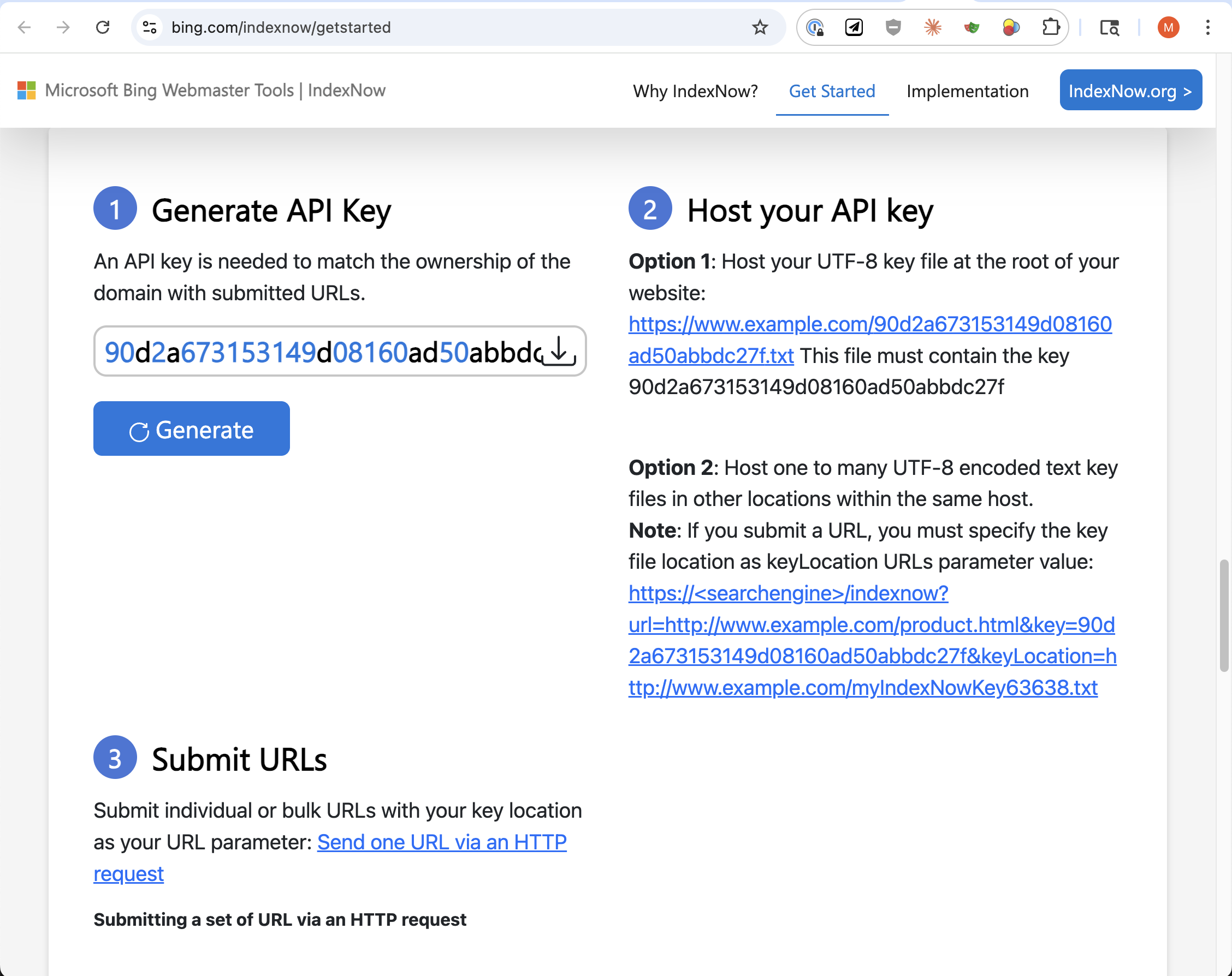
1. Generate an API key in Bing Webmaster Tools (or make your own—any 32-character hex string works).
2. Host a key file at your domain root. If your key is 90d2a673153149d08160ad50abbdc27f, create:
https://yoursite.com/90d2a673153149d08160ad50abbdc27f.txt
Contents of that file? Just the key itself:
90d2a673153149d08160ad50abbdc27f
3. Ping the endpoint when content changes.
Implementation Options
curl (manual testing):
curl "https://api.indexnow.org/indexnow?url=https://yoursite.com/new-page&key=YOUR_API_KEY"
WordPress: Both Yoast and RankMath have IndexNow built in. Enable it in settings. Done.
Next.js API route:
// app/api/indexnow/route.ts
export async function POST(request: Request) {
  const { url } = await request.json()
  const apiKey = process.env.INDEXNOW_API_KEY

  const response = await fetch(
    `https://api.indexnow.org/indexnow?url=${encodeURIComponent(url)}&key=${apiKey}`
  )

  return Response.json({ success: response.ok })
}
Call this from your CMS or deploy hook whenever you publish.
Batch submission (any platform):
async function notifyIndexNow(urls) {
  const response = await fetch('https://api.indexnow.org/indexnow', {
    method: 'POST',
    headers: { 'Content-Type': 'application/json' },
    body: JSON.stringify({
      host: 'yoursite.com',
      key: 'YOUR_API_KEY',
      urlList: urls
    })
  })
  return response.ok
}

// Submit multiple URLs at once
notifyIndexNow([
  'https://yoursite.com/blog/new-post',
  'https://yoursite.com/blog/updated-post'
])
IndexNow accepts up to 10,000 URLs per request. Use batch submission if you're updating a lot of pages at once.
Don't Block the Crawlers
Check your robots.txt. If you're blocking these bots, your content won't appear in ChatGPT:
User-agent: Bingbot
Allow: /

User-agent: GPTBot
Allow: /

User-agent: OAI-SearchBot
Allow: /
Bingbot indexes for Bing (and by extension, ChatGPT Search). OAI-SearchBot is OpenAI's dedicated search crawler. GPTBot is for training data—blocking it won't affect search visibility, but you might want to allow it anyway.
See our full breakdown of OpenAI's crawlers for the details on each one.
Monitor and Fix Issues
Bing Webmaster Tools shows crawl errors, index coverage, and which pages are actually in the index. Check it regularly.
Common problems:
- Crawl errors - pages returning 404s or 500s
- Blocked by robots.txt - you're accidentally blocking Bingbot
- Slow response times - Bing deprioritizes slow sites
- Duplicate content - consolidate with canonical tags
The URL Inspection tool lets you check specific pages. Use it to verify new content is indexed.
The Checklist
- Sitemap exists at
/sitemap.xml - Bing Webmaster Tools account created and site verified
- Sitemap submitted and showing successful crawls
- IndexNow enabled for instant updates
- Crawlers allowed in robots.txt (Bingbot, GPTBot, OAI-SearchBot)
That's the foundation. Get indexed by Bing, and you're eligible to appear in ChatGPT. The rest is about creating content worth citing.
Frequently Asked Questions
How long does Bing indexing take?
With IndexNow, new pages can be indexed within minutes. Without it, standard crawling can take days to weeks depending on your site's crawl frequency. Submitting a sitemap speeds things up, but IndexNow is the fastest option.
Do I need both GPTBot and OAI-SearchBot allowed?
For ChatGPT search visibility, you only need OAI-SearchBot. GPTBot is for training data. Many publishers allow OAI-SearchBot while blocking GPTBot to appear in search without contributing to training. See our crawler guide for details.
What if my pages aren't indexing?
Check Bing Webmaster Tools for errors. Common issues: pages returning 404/500 errors, robots.txt blocking Bingbot, slow response times, or duplicate content. The URL Inspection tool shows exactly why a page isn't indexed.
Is being indexed enough to get cited?
No. Indexing is step one—it makes you eligible. Getting cited requires content that directly answers questions, is well-structured, and is considered authoritative. See our guide to ChatGPT citations for optimization tips.
Does Google indexing help with ChatGPT?
Not directly. ChatGPT Search uses Bing, not Google. However, if you're indexed by Google, Bing can import your verified sites and often discovers those pages faster. It's worth having both, but Bing is what matters for ChatGPT.
How do I verify indexing is working?
In Bing Webmaster Tools, use the URL Inspection tool to check specific pages. You can also search site:yourdomain.com on Bing to see what's indexed. For ChatGPT specifically, ask it about topics your content covers and see if you're cited.
Want to test whether ChatGPT is actually citing your content? Try the Citation Analyzer to see which of your pages appear in AI search results.
Related Articles
How Our AI Generates Strategic FAQ Questions
Learn how datagum.ai's FAQ generation adapts to your content type. Articles get expertise testing, landing pages get organic discovery testing.
JSON-LD Schema Generation: Making Your Content AI-Ready
Learn how structured data helps search engines and AI systems understand your content, and how our tool generates Schema.org markup automatically.
Is AIO, AEO, LLMO, GEO Different from SEO? Yes, It Really Is
Why optimizing for AI search is fundamentally different from traditional SEO, and what industry leaders are saying about the shift to Answer Engine Optimization.